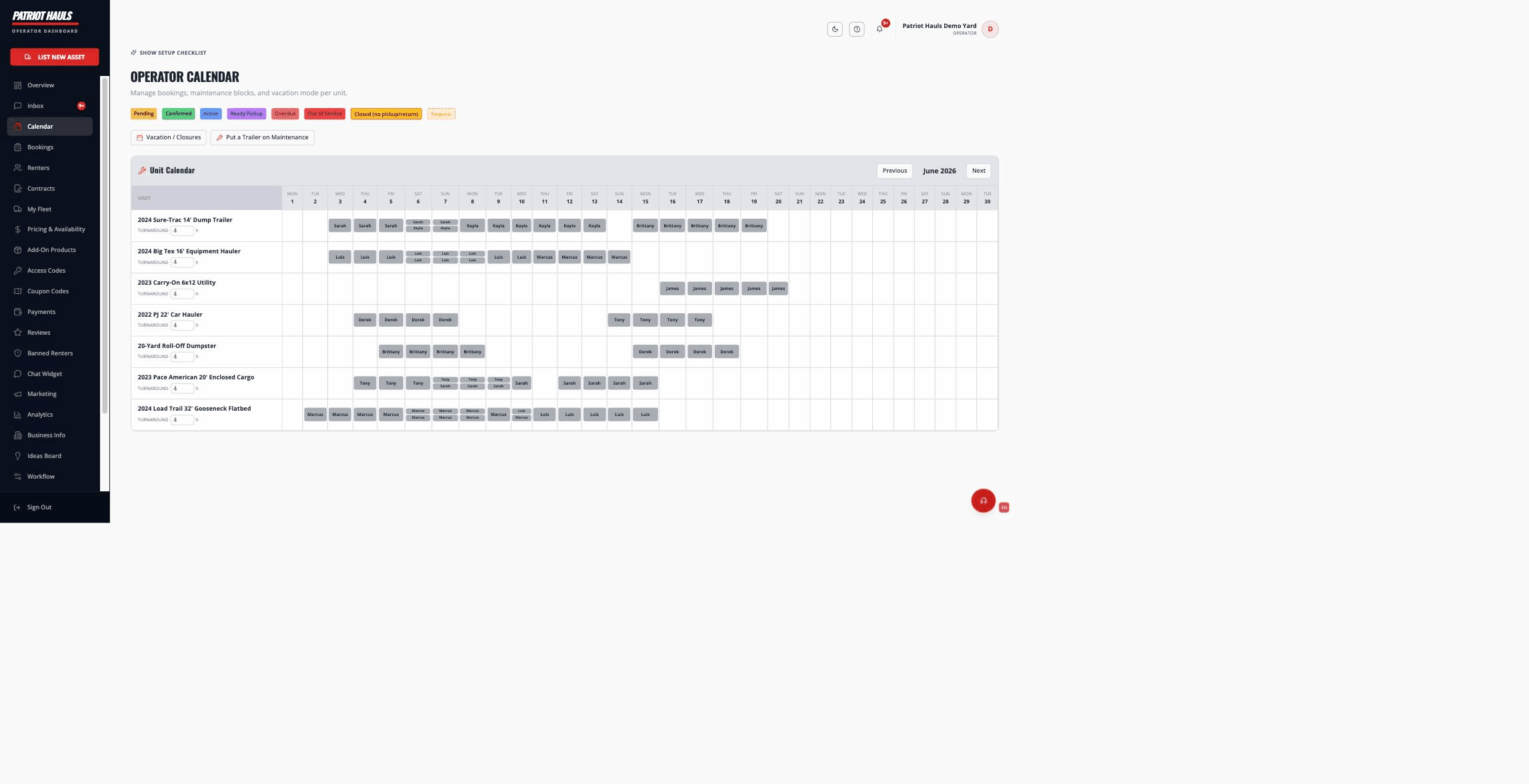
Your Operator Calendar is a per-unit month grid that shows every booking, maintenance block, and closure in one view. It's where you see what's reserved and keep your real-world availability accurate.
Reading the calendar
Each row is one unit; each column is a day. Booking blocks are color-coded:
- Yellow — Pending
- Green — Confirmed
- Blue — Active
- Purple — Ready for pickup
- Red — Overdue, or a unit marked Out of Service
- Amber — Closed for pickup/return (rentals can still span across the day)
Use Previous / Next to change months. Click any booking block to open its detail panel, where you can view it, extend it, reassign the unit, mark it returned, return the deposit, or cancel.
How availability is calculated
Availability is checked per unit for the renter's exact pickup-to-return window. A unit is shown as available unless something conflicts:
- An existing booking overlaps the window (cancelled and refunded bookings don't count).
- The turnaround buffer hasn't elapsed (see below).
- The day is blocked as out of service or maintenance.
- A closure applies — a vacation period, vacation mode, or a weekday you're closed.
Good to know: Closed days (vacation, closed weekdays) block pickups and returns on those days only. A rental can still span across them — a renter can pick up Friday and return Monday even if you're closed Saturday and Sunday.
Turnaround between rentals
The turnaround buffer is the gap you need between one rental ending and the next one starting — time to clean, inspect, and reset the unit. Set a default for your business, and override it per unit right on the calendar. Here's exactly how it's applied:
- The clock runs from the return time, down to the minute. If a rental returns at 8:00 AM and the unit has a 2-hour buffer, the next pickup can be 10:00 AM or later that same day. A morning return doesn't block the whole day — the unit goes back to work as soon as the buffer has passed.
- Back-to-back at the same minute is never allowed, even with a zero buffer. One renter can't be dropping off at the exact moment another picks up — with no buffer, an 8:00 AM return means the next pickup is the following time slot, not 8:00 AM sharp.
- Renters can't pick a conflicting time. Times inside an existing booking's window (plus your buffer) show as "unavailable" in the renter's time picker, and the same rule is enforced again at checkout and at the database — what a renter sees as bookable is exactly what will book.
Good to know: If you want same-day turnarounds to actually earn — a return in the morning, a fresh rental that afternoon — see Same-day and hourly rentals for letting renters book a pickup and return on the same day.
Pooled availability
Availability is pooled across like units. When you have several interchangeable units of the same type, a renter's booking holds one unit from that pool — not a specific VIN — so the type stays bookable as long as at least one unit is free for the dates. You can assign or reassign the exact physical unit on a booking from the calendar (Reassign) or the booking detail, and you can swap to a different unit later if needed.
Related articles
- Same-day and hourly rentals
- Pickup and return hours
- Block off dates
- Pickup locations and yards
- How bookings work
Still need help? Tap the Support button inside your dashboard.