You don't have to fill out a signup form to rent on Patriot Hauls. When you complete your first booking, an account is created for you automatically — and you stay in control of it.
Your account is created for you
After you pay for your first rental, Patriot Hauls sets up your account using the email on the booking and emails you a magic login link. Tap it to sign in — no password to remember. From your account you can:
- See all your rentals under My Bookings
- Reuse your saved license and insurance on future bookings
- Rebook trailers you've rented before
Tip: Need to sign in later? Use the magic-link login — you'll get a fresh link by email each time, so there's no password to reset.
Delete your account
You can permanently delete your account whenever you want, right from the app.
- Go to Settings.
- Scroll to the Danger Zone.
- Tap Delete My Account and confirm.
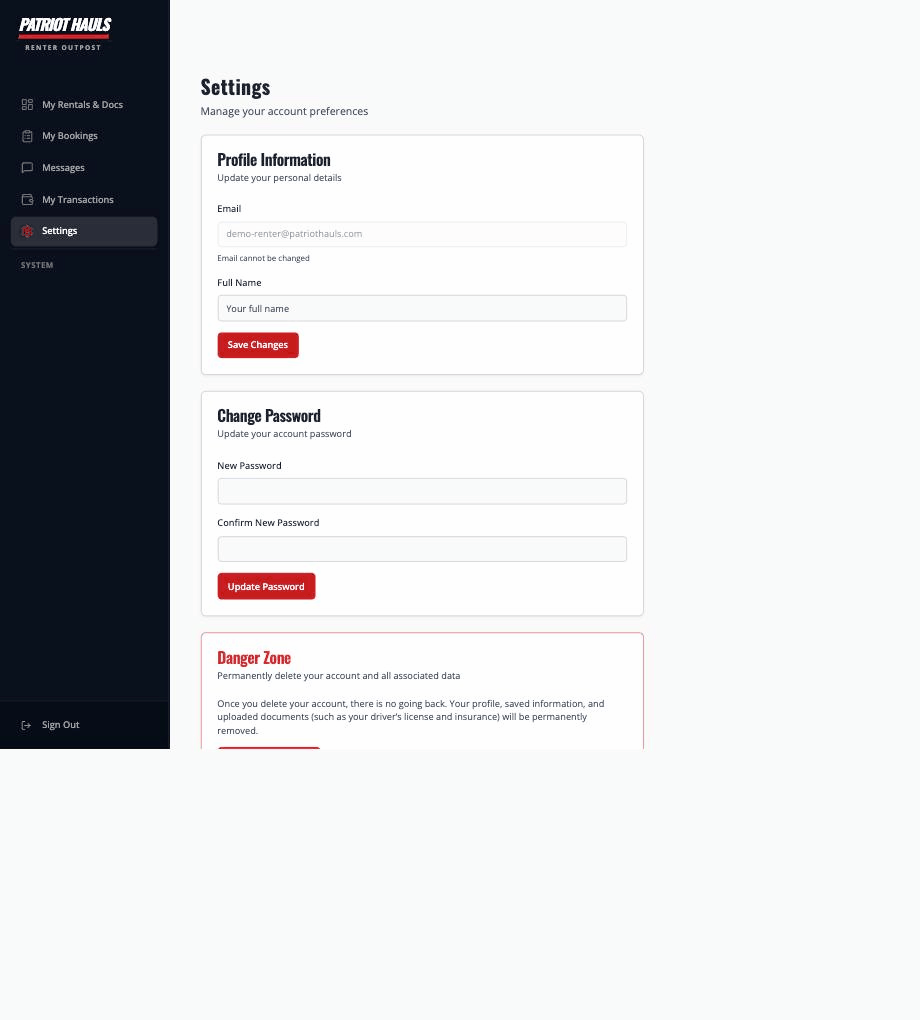
Deletion is permanent and can't be undone. Your profile, saved information, and uploaded documents — including your driver's license and insurance — are permanently removed, and you're signed out.
Good to know: Records that an operator is legally required to keep for a completed rental (like a signed contract or invoice) are retained on the operator's side, but your personal details are scrubbed from them.
If you ever have trouble deleting your account, email support@patriothauls.com and the team will help.