Verification isn't optional on Patriot Hauls. Every unit you list requires a verified driver's license and verified insurance, and the checkout is built to fail closed — a missing, pending, or failed verification blocks the booking. It never quietly lets the rental through.
What "fail closed" means
During the renter's Documents step, the platform checks both their ID and insurance before the booking can complete:
- If identity still needs verifying, the booking is held in a pending state — the renter's slot and payment hold stay in place — and they're told to finish the Stripe Identity check. Nothing confirms until they do.
- If a required document can't be verified — not insurance, expired, or ID not verified — the booking is stopped and the renter is told exactly what to fix.
- A renter can't skip past the step with nothing selected. There's no path that advances to "done" with documents unverified.
Good to know: If a renter abandons their documents and never finishes, the payment hold is released and the booking is cancelled automatically. You're never left with a confirmed booking on an unverified renter.
Choose how strict you are
You set this in Settings → Workflow under Document Verification. Both options block a failed document by default — the difference is whether you can wave one through:
- Hard block (default — maximum protection): a renter cannot finish booking until their documents pass verification. There is no manual override. This is the safest choice.
- Allow my override: failed documents are still flagged and blocked by default, but you can approve a renter manually — for example, if you've verified them in person or they have an unusual commercial policy.
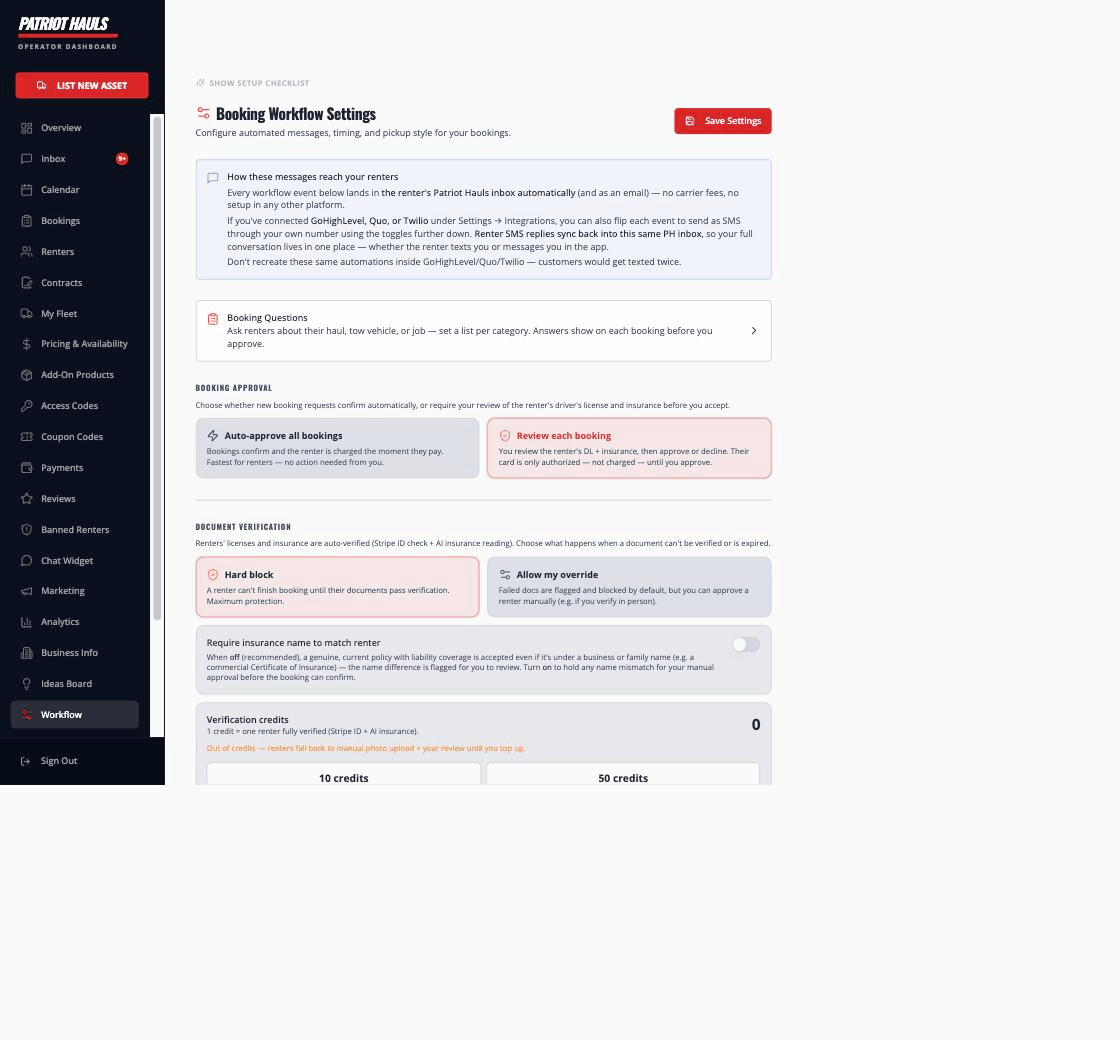
Even on Allow my override, nothing slips through silently. A failed doc is held and surfaced to you; the booking only proceeds if you actively approve it on the booking (for insurance, via Approve insurance manually).
Auto-approve vs. review
How a passing booking finalizes depends on your booking-approval setting:
- Auto-approve on: once all required docs pass, payment is captured and the booking confirms immediately.
- Review each booking: docs are submitted and you're notified, but the booking stays authorized until you approve it.
Either way, the verification gate comes first — approval logic only runs after the documents pass (or you've overridden them).
Related
- Insurance verification — the AI insurance check and the name-match setting.
- ID verification — Stripe Identity and verification credits.
- Verified renter docs overview — how the whole system fits together.
Still need help? Tap the Support button inside your dashboard.