Your reputation is what closes renters. The Reviews dashboard brings every review together, shows how you're trending, and gives you the tools to reply, import, and ask for more. It's part of the Elite plan and up.
Open Reviews from the sidebar.
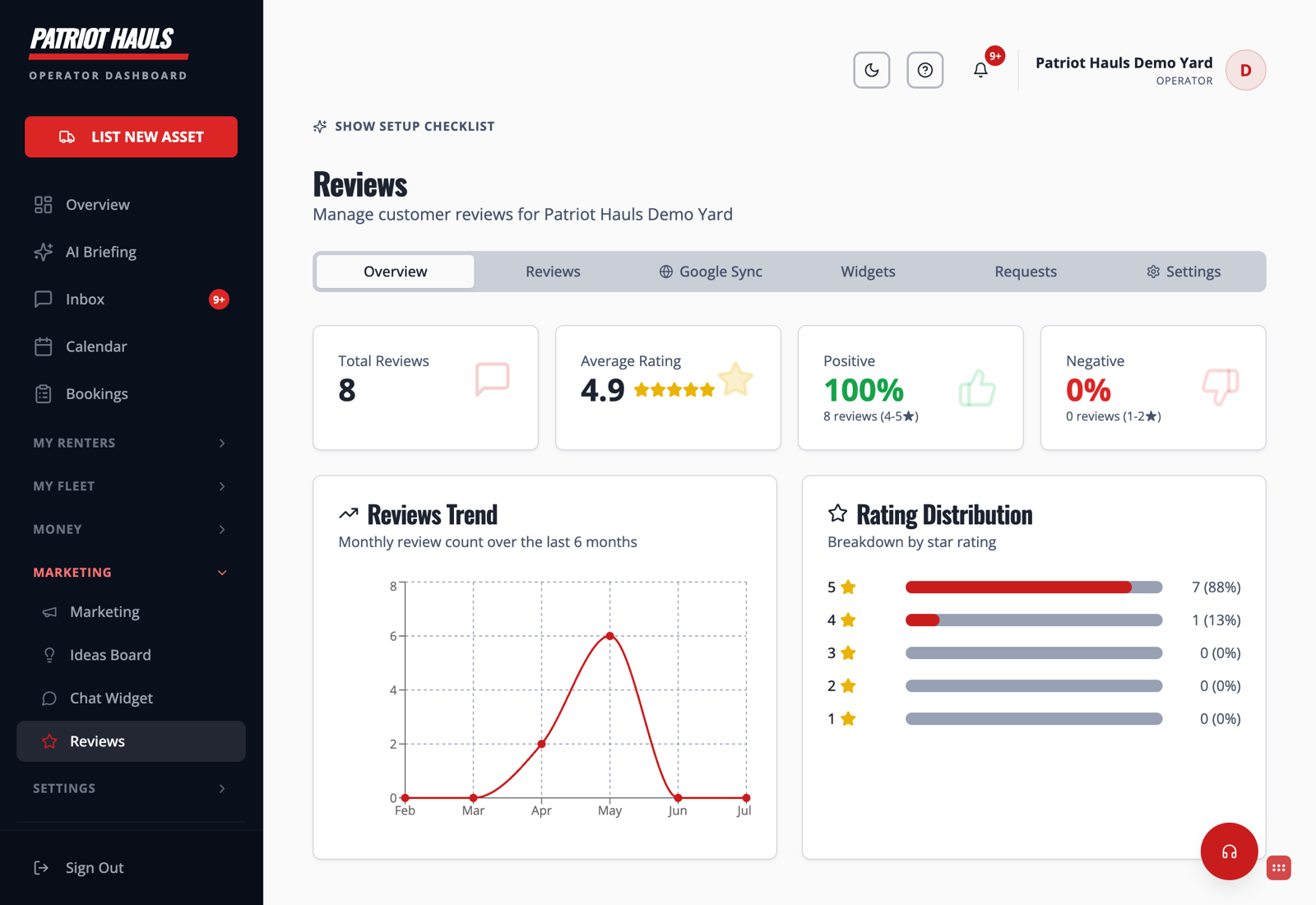
The Overview tab
The landing tab gives you the fast read:
- Total Reviews and Average Rating across everything you've collected.
- Positive and Negative percentages so you can spot problems early.
- Reviews Trend — a monthly count over the last six months.
- Rating Distribution — how many 5-, 4-, 3-, 2-, and 1-star reviews you have.
The other tabs
- Reviews — the full list, with an AI summary, common keywords, and a reply button on each. See Reply to reviews with AI.
- Google Sync — bring your existing Google reviews in. See Import your Google reviews.
- Widgets — embed your reviews on your own website.
- Requests — ask past renters for a review. See Collect more reviews.
- Settings — control how reviews are collected and displayed.
Tip: Reviews build trust even for renters who never leave one — a strong star rating on your storefront is doing quiet sales work every day. Keep the flywheel turning by requesting a review after every clean return.
Still need help? Tap the Support button inside your dashboard.