The Briefing Room is your AI co-pilot, Hank. Instead of making you dig through reports, it reads what's happening across your account and hands you a clear, prioritized read on your business — and the single next move most likely to make you money.
Open it from AI Briefing in the sidebar.
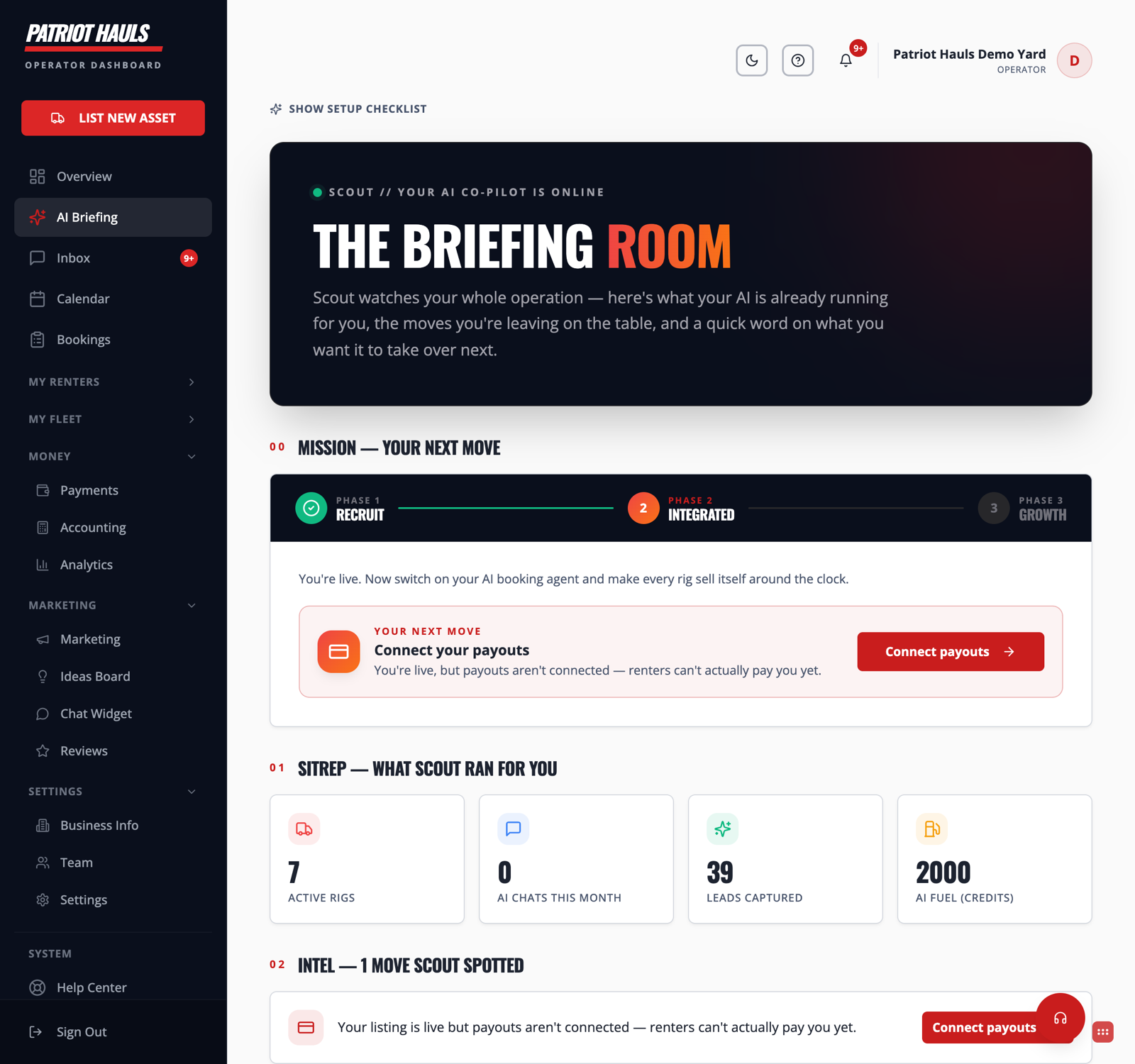
What you'll see
- Mission / Your Next Move — the one action Hank thinks matters most right now, based on your current numbers and gaps.
- SITREP — a fast status report: your Active Rigs (units live), AI Chats, Leads Captured, and remaining AI Fuel (credits).
- Intel — notable signals worth your attention: new leads, bookings, reviews, or things slipping.
- Lifecycle stage — where your business sits on the path from Recruit to Integrated to Growth, so you know what to focus on next.
How to use it
- Start your day in the Briefing Room.
- Read the Next Move and do that one thing.
- Glance at the SITREP to make sure nothing's off — low AI Fuel, no active rigs, a stalled lead.
- Move on. The point is one clear action, not another dashboard to babysit.
Tip: Treat the Briefing Room like a morning stand-up with a sharp assistant. Two minutes here beats an hour of guessing what to work on.
See what the daily read includes in The daily briefing and your wins.
Still need help? Tap the Support button inside your dashboard.